
Series page
- Create or remove a series of points.
- Define the series name, visibility and view type.
- Customize additional series options, point and legend point options.
- Enable and customize the Top N Values feature.
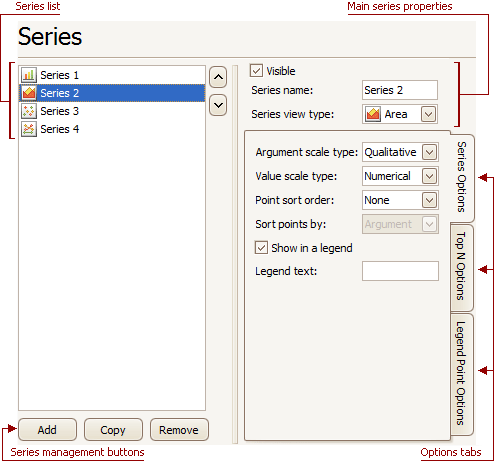
Series list displays all available series. You can click on list entries to access properties of the corresponding series. To switch between series, use the ∧ and ∨ buttons.
Series management buttons
Use the Add, Copy and Remove buttons to manage the series collection.
Options tabs
The following tabs are available on this page:
| Tab | Description |
|---|---|
| General | Choose whether the selected series should be visible, define its name, and select a view type. |
| Series Options | Specifies argument and value scale types, point sort order, visibility in legend and legend text. |
| Top N Options | Specifies whether the Top N Values feature is enabled, and allows you to control the feature options. |
| Legend Point Options | Specifies the format of values displayed in the chart legend. |